Buy 2. Buy 3.
Shoppers see the saving before checkout.
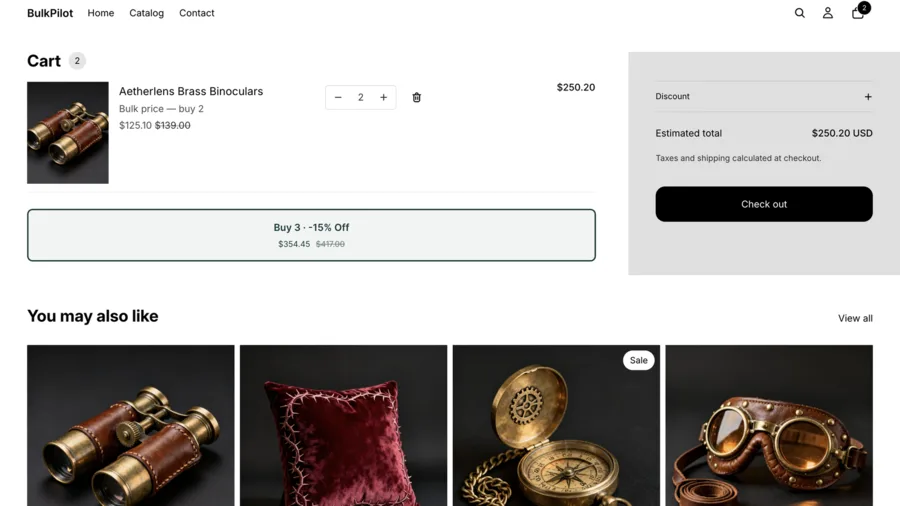
BulkPilot adds bulk-price buttons to your product and cart pages — "Buy 2 for $X" and "Buy 3 for $Y." Shoppers see the saving up front and buy more, helping conversion and AOV.
Free plan covers 1 product. Pro is $9.99/month for unlimited products — billed through Shopify.
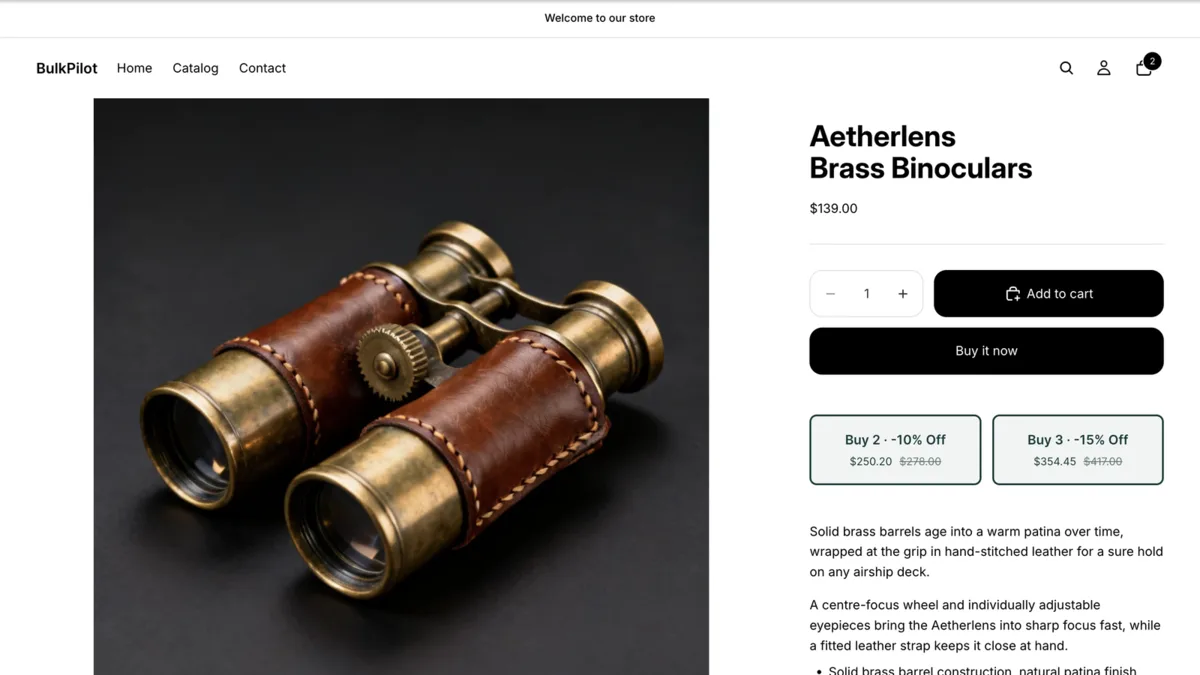
Set a tier once. It shows up everywhere it needs to.
Buy-more-save-more buttons, set from one screen in your Shopify admin, applied automatically at checkout — no discount code for the shopper to enter.
"Buy 2 for $X" and "Buy 3 for $Y" buttons
Quantity-break pricing shown right on the product, so shoppers see the saving before they add to cart.
Blocks for product page and cart page
Add the BulkPilot block to your product template and your cart template in the theme editor. Both stay in sync with the same tier rule.
Fixed price or percentage off
Enter a fixed "Buy 2" and "Buy 3" price, or switch to percentage off — the other value auto-calculates.
Buttons hide when stock can't cover it
If a variant doesn't have enough inventory for "Buy 2" or "Buy 3," that button hides automatically — never a broken promise at checkout.
Sale price or original price as the base
Choose whether your bulk tiers are calculated from a product's current (sale) price or its original price — your call, in Settings.
Runs on Shopify's native checkout
No discount code for the shopper to enter, and no Shopify Plus required. Cart drawers aren't supported yet — cart-page and product-page blocks are.
Three steps to your first bulk-price button
The app blocks don't place themselves — adding them in the theme editor is a one-time step per template.
Install
BulkPilot creates its own automatic discount, "BulkPilot bulk prices," on install — nothing to configure for that part.
Add the theme blocks
Online Store → Themes → Customize: add the BulkPilot block to a product template, and to the cart page template.
Set a tier rule
Pick a product, enter a Buy 2 and Buy 3 price — or switch to percentage off and the price auto-calculates — then save.
One product free. Unlimited on Pro.
Both plans get every feature — tier rules, both theme blocks, stock-aware buttons, sale-vs-original pricing. The only difference is how many products can have an active tier.
Free
$0
- 1 product with bulk-price tiers
- "Buy 2" / "Buy 3" buttons on product and cart pages
- Fixed price or percentage-off tiers
- Stock-aware buttons
- Choose sale-price or original-price base
BulkPilot Pro
$9.99/month
- Unlimited products with bulk-price tiers
- "Buy 2" / "Buy 3" buttons on product and cart pages
- Fixed price or percentage-off tiers
- Stock-aware buttons
- Choose sale-price or original-price base
Billed and enforced entirely through Shopify's own subscription system. Cancel anytime.
Frequently asked questions
Straight answers about how BulkPilot's bulk-price buttons work.
Why don't I see the bulk-pricing buttons on my storefront?
Two things have to be true: the product needs a tier configured in Tier rules, and the theme app block needs to be added to your product and cart templates in Online Store → Themes → Customize. Adding the app doesn't place the blocks automatically — that's a theme editor step.
Does the cart drawer show the buttons too?
Not in this version. BulkPilot's cart block renders on the cart page template only; a drawer-style cart (the default on Dawn and most Online Store 2.0 themes) is a known limitation, planned for a future update.
Why did checkout apply a different discount than my tier?
BulkPilot's discount combines with order-level and shipping discounts, but not with other product-level discounts. If another app or a store-wide product discount is active on the same item, Shopify applies whichever one wins under its own combination rules — that is expected, not a bug.
What does the "current vs. original price" setting do?
In Settings, you choose whether bulk pricing is calculated from the product's current selling price or its original price. This matters when a product is already on sale — it decides whether your bulk discount stacks on top of that sale or is based on the regular price.